
Parven’s Digital Parenting Rundown for October 2026 covers the latest online safety news for parents. The rest of this post walks through Roblox parental controls, step by step, as they work today.
Short answer: To set up Roblox parental controls, link your own Roblox account to your child’s account, then open Settings, tap Parental controls and choose your child. Four settings do most of the work there: content maturity, chat, a daily screen time limit and a monthly spending limit. Since June 2026, Roblox also puts children under 16 into age-based accounts with stricter rules, but no setting shows you what other players say to your child, or where they ask your child to go next.
In short:
- The settings work best from your own linked parent account, so you can change settings from your phone.
- Roblox now sorts children by age: Roblox Kids for ages 5 to 8, Roblox Select for ages 9 to 15, and the standard app from 16.
- Nobody can chat on Roblox without first passing an age check, and children under 9 need a parent’s consent to chat at all.
- The four settings that matter most are content maturity, chat, screen time and spending.
- No setting follows your child if another player asks them to carry on the conversation on Discord, Snapchat or WhatsApp, so a calm conversation matters as much as the settings.
Why Roblox parental controls matter
Ofcom’s 2026 report on children and parents found that 51% of UK children aged 8 to 14 use Roblox. For that age group, only YouTube, WhatsApp and TikTok are more popular. The full Ofcom report on children’s media use has the detail.
Roblox is not one game. Players build their own games on it, and there are millions of them. Children can talk to other players inside those games, and that chat is where most of the risk sits. In May 2026, Ofcom published the safety promises it secured from tech firms, and stopping adult strangers from contacting children was the focus of Roblox’s section.
What changed on Roblox in 2026?
Roblox made two big changes this year.
January 2026: an age check before any chat. Roblox now asks every player to pass an age check before they can chat. The player either takes a short video selfie, which software uses to guess their age, or uploads ID. Roblox says it deletes the images once it has checked them. Children under 9 need a parent’s consent before they can chat at all. Roblox’s announcement of the age checks explains who can chat with whom.
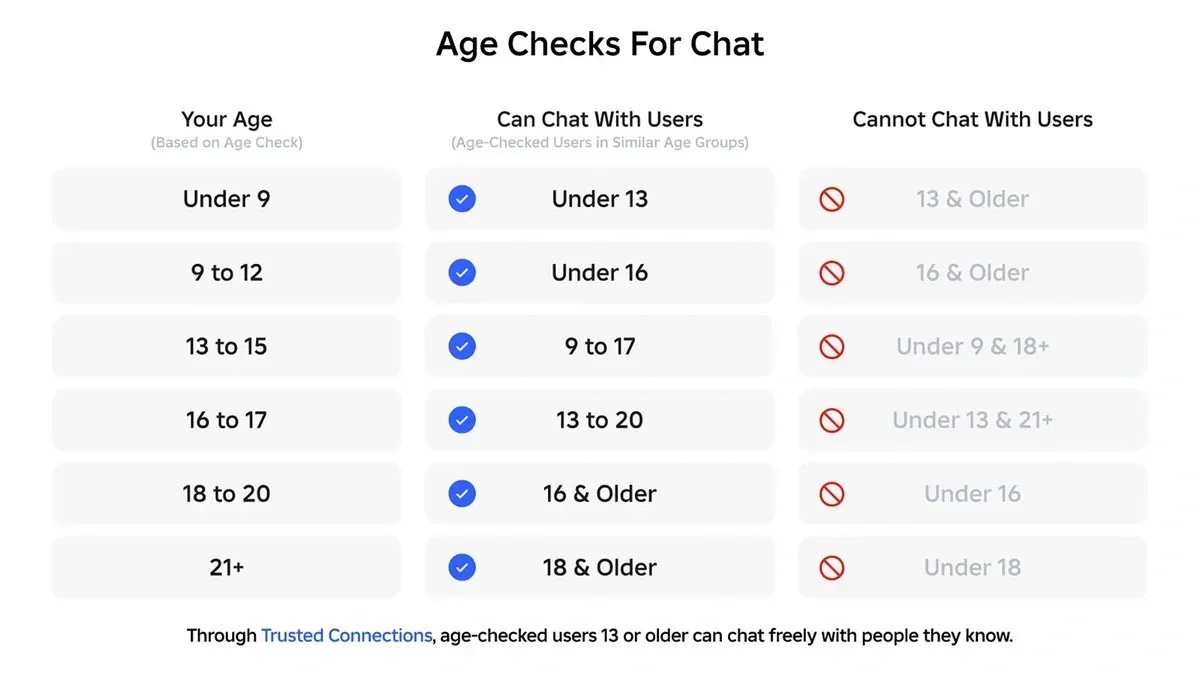
Image: Roblox
June 2026: separate accounts by age. Roblox now gives every child under 16 one of two account types. Roblox Kids covers ages 5 to 8, and Roblox Select covers ages 9 to 15. Each one limits which games your child sees, and moves up automatically on their birthday.
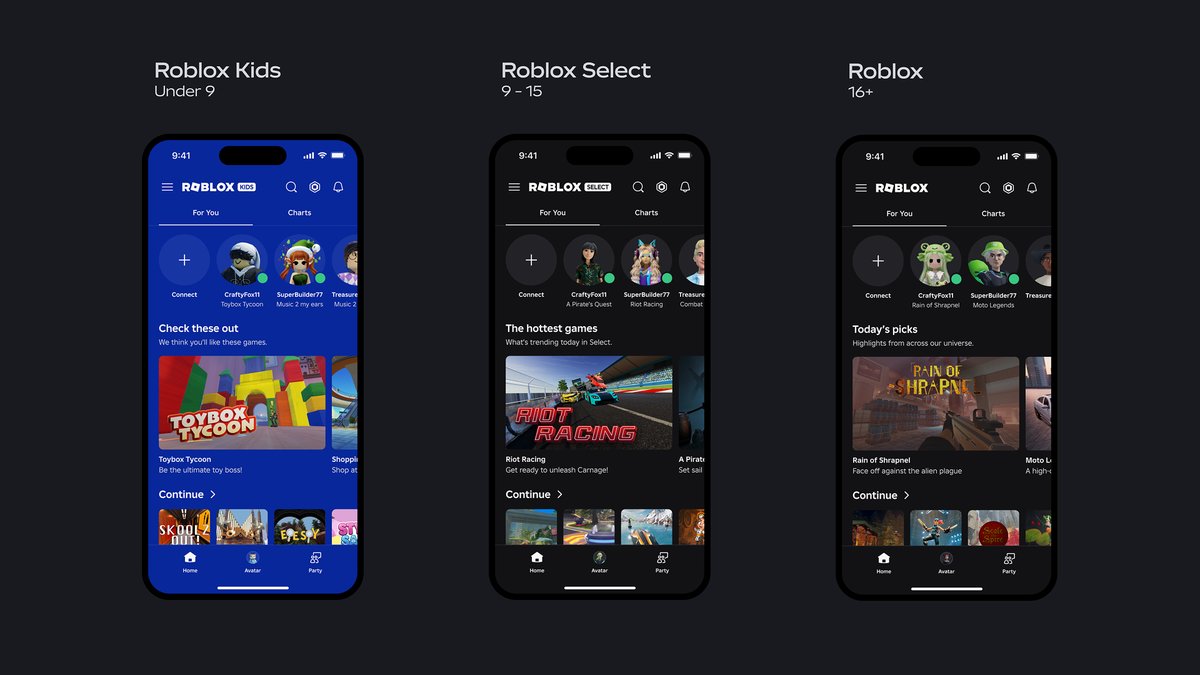
Image: Roblox
| Account | Ages | Chat | Games |
|---|---|---|---|
| Roblox Kids | 5 to 8 | Switched off by default. A linked parent can allow chat inside games. | Only games rated Minimal or Mild that Roblox has given an extra review |
| Roblox Select | 9 to 15 | Only after an age check, and mainly with players of a similar age and Trusted Friends | Games rated up to Moderate that Roblox has given an extra review |
| Standard Roblox | 16 and over | Switched on after an age check | All games except those rated Restricted, which are for verified adults only |
Roblox also leaves some types of game out of the Kids and Select accounts altogether: social hangout games, free drawing games, and games about sensitive subjects. Roblox’s guide for families sets out the full rules.
These changes help. They do not replace changing the settings yourself, because the default settings still allow more than most parents of a 9 year old would choose.
How to set up Roblox parental controls, step by step
Step 1: Link your account to your child’s. Roblox gives you two ways to manage the settings. You can create your own Roblox account and link it to your child’s, or you can use Parent mode on your child’s device. Linking is better, because you can then change settings and approve requests from your own phone, and Roblox emails you about spending.
To link, ask your child to open Settings, tap Parental controls, tap Add parent and type in your email address. Roblox sends you an email. Open it, create your own account or sign in, and confirm you are an adult with a government ID or a credit card. Then tap Agree.
Step 2: Open your child’s page. On your own account, open Settings, tap Parental controls and choose your child. Their page shows any requests waiting for you, their Robux balance, their screen time, the games they play most and their friends. Scroll down to Settings you manage.
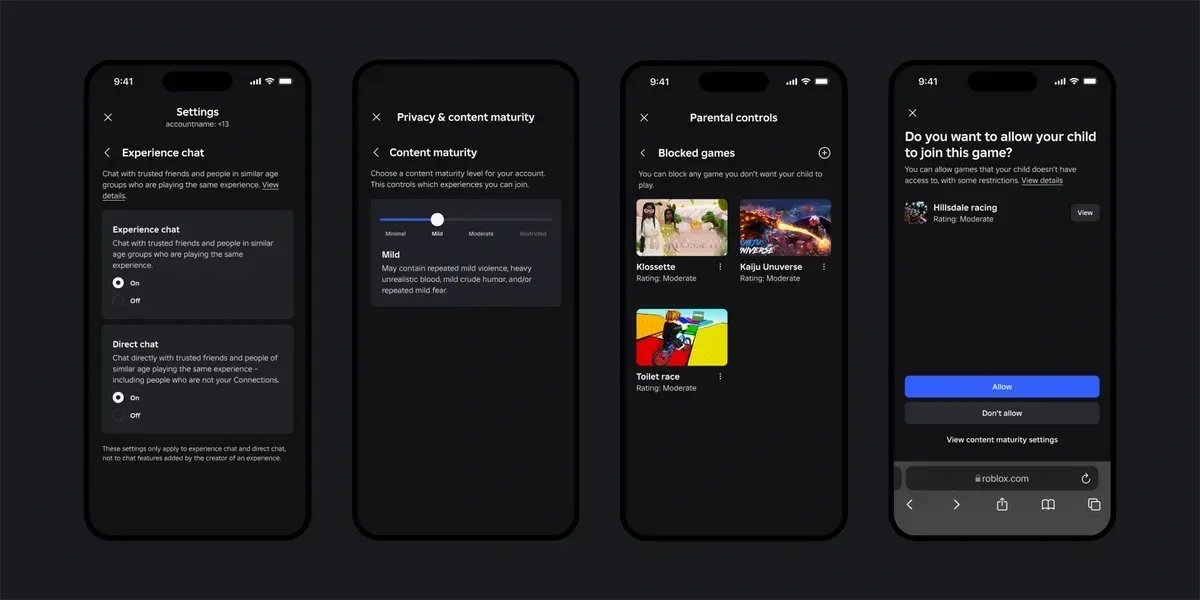
Image: Roblox
Step 3: Work through the four settings that matter.
| Setting | What it does | A good starting point |
|---|---|---|
| Content maturity | Decides which games your child can join, from Minimal up to Restricted | Minimal or Mild for under 9s. Mild or Moderate from 9, after you have looked at a few games yourself. |
| Chat | Decides whether your child can chat inside games and in private messages, and with whom | Direct chat off. Chat with Trusted Friends only. Voice chat set to No one. |
| Screen time | Sets a daily limit, after which Roblox locks for the rest of the day | A limit that matches your house rules for school days |
| Spending restrictions | Sets a monthly limit on Robux and game subscriptions | A fixed monthly amount, with spending emails switched on |
The four Roblox parental controls that do most of the work
Content maturity. Every Roblox game carries a label: Minimal, Mild, Moderate or Restricted. Minimal games may contain occasional mild violence. Moderate games can include moderate violence, some realistic blood and crude humour. Restricted games are only for adults who have proved their age with ID. Move the slider to the level that suits your child.
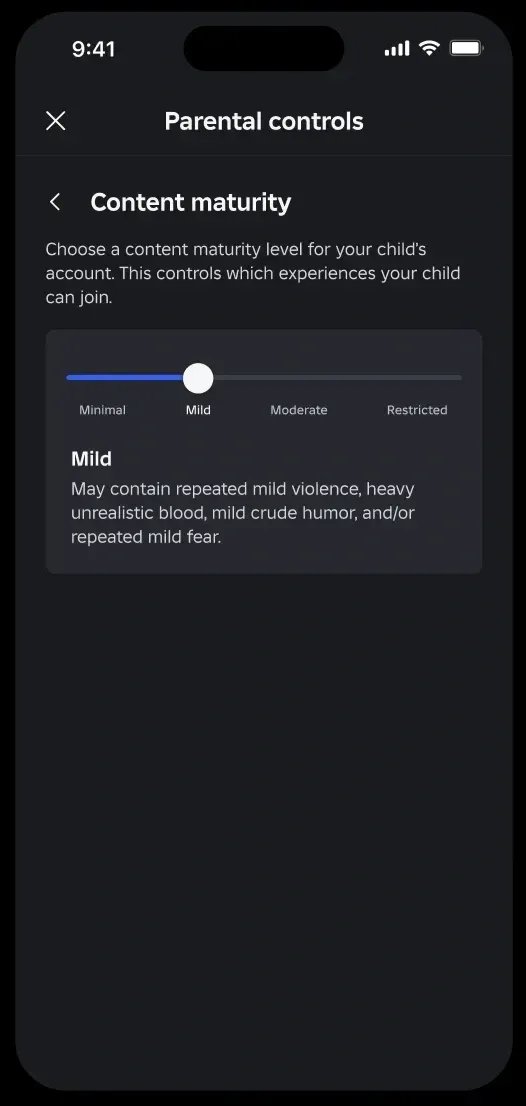
Image: Roblox You can also block a single game your child should not play, whatever its label, under Blocked games.
When your child wants a game outside their level, they can send you a request. It arrives by email and in your child’s page under Pending requests, and you tap Allow or Don’t Allow.
Chat. This is the setting that matters most, because chat is how a stranger reaches your child. Roblox gives you separate switches for chat inside games and for direct chat, which works like private messaging. For a child under 13, switch Direct chat off, set Chat and party with friends to Trusted Friends, and set Voice chat to No one. Trusted Friends are people your child knows in real life, and a parent has to approve them for a child under 13.
Under Connections, you can see your child’s Roblox friends, and block or report any of them. Look through the list with your child, not behind their back. Ask who each person is. Anyone your child cannot place is worth removing.
Screen time. You can set a daily limit for any child on a Roblox Kids account, and for 9 to 12 year olds on Roblox Select. Once your child reaches the limit, Roblox locks for the rest of the day. The limit cannot set when your child plays, only how long for, so it does not stop a child spending the whole limit during homework time. From 13, your child manages their own limit.
Spending. Children spend real money on Robux, the currency inside Roblox. A monthly spending limit caps it, and resets at the start of each month. Switch on spending emails too, so you see each purchase. Gift cards sit outside the limit, so a child with a gift card from a birthday can still spend it. Spending limits stop applying at 13.
Parven talks through whether Roblox suits your child in this video:

What Roblox parental controls cannot do
This part explains why you can set everything up correctly and still feel uneasy.
The age check guesses, and it can be wrong. Roblox says its age estimate is, on average, out by 1.4 years for players under 18. So a 12 year old can come out as 13 or 14, and land in a group with older teenagers. If the age looks wrong, you can correct it once from your child’s page in Parental controls.
They stop at the edge of Roblox. If another player asks your child to carry on talking on Discord, Snapchat or WhatsApp, your Roblox settings no longer apply. That request to move somewhere else is the moment to watch for. Tell your child plainly that anyone asking them to move a chat off Roblox is a reason to come and get you.
Roblox does not always get it right either. In August 2025, Roblox banned Schlep, a YouTuber who had been exposing adults who targeted children on the platform. Roblox said he broke its rules against players acting as vigilantes. Many parents asked why Roblox banned the person exposing the problem. Parven explains what happened and what it means for families:

They only cover your child’s account. A friend’s account, a sibling’s login or a games console in someone else’s house all sit outside your settings.
So these settings are worth the twenty minutes they take. They keep out most of the obvious dangers. They do not replace knowing who your child plays with.
What to do alongside the settings
Play a game with your child. Ask them to show you their favourite game and play it with them for ten minutes. You learn what the game involves, and your child learns that Roblox is something they can talk to you about.
Go through the friends list together, every few weeks. Ask who each person is and how your child knows them.
Tell your child they will not lose Roblox for telling you. Say it plainly: if anyone on Roblox says something that frightens or upsets you, or asks you to send a photo or move to another app, come and tell us, and you will not lose the game. Children who expect to lose the game tend to deal with frightening things alone. Our post on sextortion shows why that promise matters so much.
If your child also has a phone, our guide to parental controls on iPhone covers the settings that stop strangers messaging them there.
Roblox and safer family gaming training
Our Roblox and Safer Family Gaming Workshop covers this properly: setting up Roblox parental controls on the spot, managing chat and friends, understanding the game labels, controlling Robux spending, and setting gaming boundaries without a daily argument.
It is a practical, hands-on session, not another list of online risks. Parents bring their own device and change the settings as they go. The session lasts one hour, runs as a live webinar or in person, and works for schools, parents’ groups, community organisations and employers who want to support the working parents in their team.
If you run a school, a parents’ group or a workplace, book the Roblox workshop here or connect with Parven on LinkedIn.
Parven Kaur is a digital parenting and online safety expert, and the founder of Kids n Clicks. She won the Scottish Cyber Security Award, and she sits on the National Board of Advisors for Barnardo’s Scotland.
Was this helpful?
Good job! Please give your positive feedback
How could we improve this post? Please Help us.