
Short answer: The Balance Phone is a smartphone with the safety built into the phone itself. Social media, games, streaming, gambling, dating and porn are locked out for good, and a child cannot switch them back on. Calls, texts, WhatsApp, maps, the camera and school apps all still work. In our Balance Phone review, it comes out as an excellent transition phone for teenagers aged around 14 to 16, the step between a basic phone and a full smartphone. Parven also uses one herself to cut down on her own phone use.
In short:
- The safety features live inside the phone, not in an app, so they cannot be deleted, switched off or wiped away.
- It arrives ready to use, with no settings for a parent to work through.
- An optional add-on covers nude images the moment they appear, and can switch off WhatsApp, web browsers and AI chatbots.
- The Balance Phone Kids costs £299 in the UK, with no monthly fee unless you add the extras.
- Kids n Clicks sees it as a transition phone for ages 14 to 16. Under 14, we recommend starting with a basic phone.
- It works brilliantly for adults too, and Parven uses one to cut down on her own phone use.
Parven’s Digital Parenting Rundown for November 2026 covers the latest online safety news for parents. In the last two minutes of the video, she reviews the Balance Phone.

Why we wanted to review the Balance Phone
At Kids n Clicks, we love testing the phones and gadgets families ask us about. Now we have got our hands on the Balance Phone, and it is one of the most interesting phones we have reviewed.
Around a quarter of children aged 5 to 7 in the UK already own a smartphone. That is 24%, according to Ofcom’s 2024 research on young children’s online lives.
So the question most parents face is not whether their child gets a phone, but what kind of phone, and when.
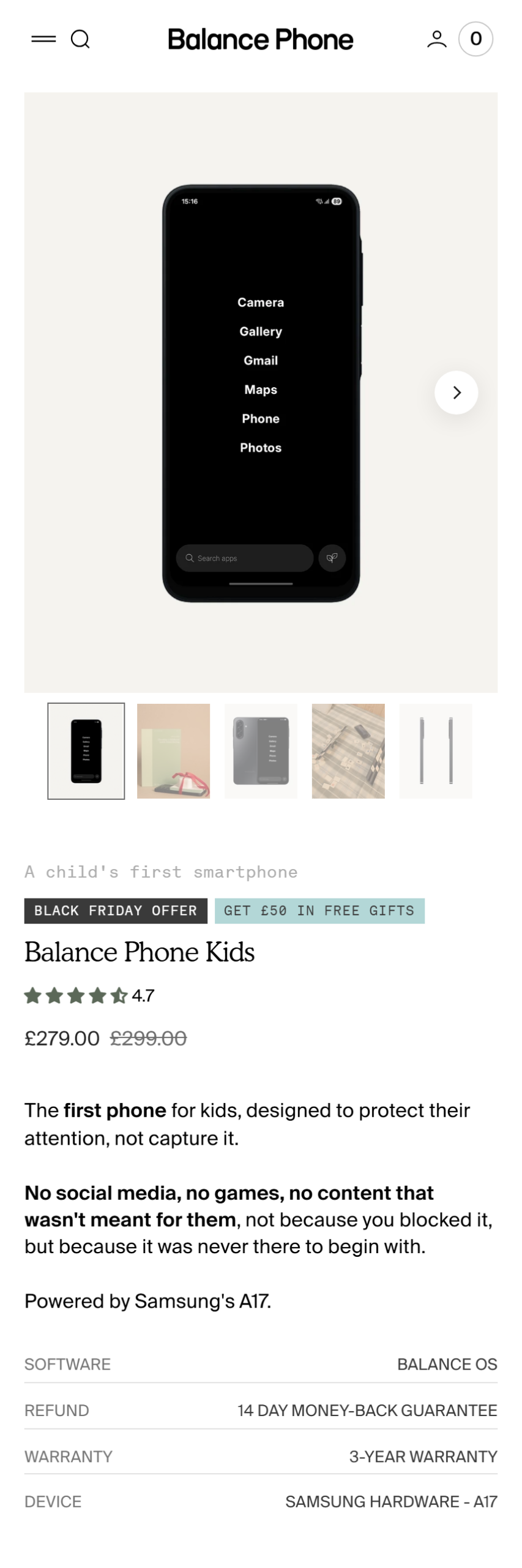
The Balance Phone comes from a company in Barcelona, and on the outside it looks like any other smartphone.
What makes the Balance Phone different?
What makes this phone so interesting is that the safety is built into the phone itself.
On most phones, safety is something a parent adds afterwards. You download an app, work through the settings, and hope you have not missed anything.
The Balance Phone works the other way round. It runs its own software, called Balance OS, and the harmful parts of the internet are simply not there.
Here is what that looks like:
| Type of app | On the Balance Phone | Examples |
|---|---|---|
| Social media | Blocked, as apps and as websites | TikTok, Instagram, Snapchat, Facebook, BeReal |
| Games | Blocked | Roblox, Minecraft, Fortnite, Among Us, Candy Crush |
| Streaming | Blocked | YouTube, Netflix, Disney+, Twitch |
| Gambling, dating and porn | Blocked | Bet365, Tinder, OnlyFans and similar sites |
| Calls, texts and messaging | Works | Phone, Messages, WhatsApp (with WhatsApp Status switched off) |
| Getting around | Works | Google Maps, Life360, train and bus apps |
| School | Works | Google Classroom, Drive, Calendar |
| Music | Works | Spotify, Apple Music |
| Browsing | Works, with a filter | Chrome and Ecosia only, with Google SafeSearch locked on |
What we like about the Balance Phone
There is no way round it. This is our favourite part of the Balance Phone review.
Balance OS is not an app sitting on top of the phone. A child cannot delete it, switch it off in settings, or get rid of it by wiping the phone. Balance says even a factory reset brings it straight back.
Only the person who bought the phone can remove it, and only through a check with Balance.
It still feels like a real phone. Most phones made for children only let you use a short list of approved apps.
The Balance Phone has the full Google Play Store. Your child can download the school app, the bus app or the football club app without anyone approving it. If an app is in a blocked group, it simply will not open.
You can check any app first. Wondering whether a particular app works? Balance has a free checker on its Balance Phone Kids page. Type in the name and it tells you straight away.
How easy is the Balance Phone to use?
The Balance Phone is very easy to use, and this is where it really stands out for busy parents.
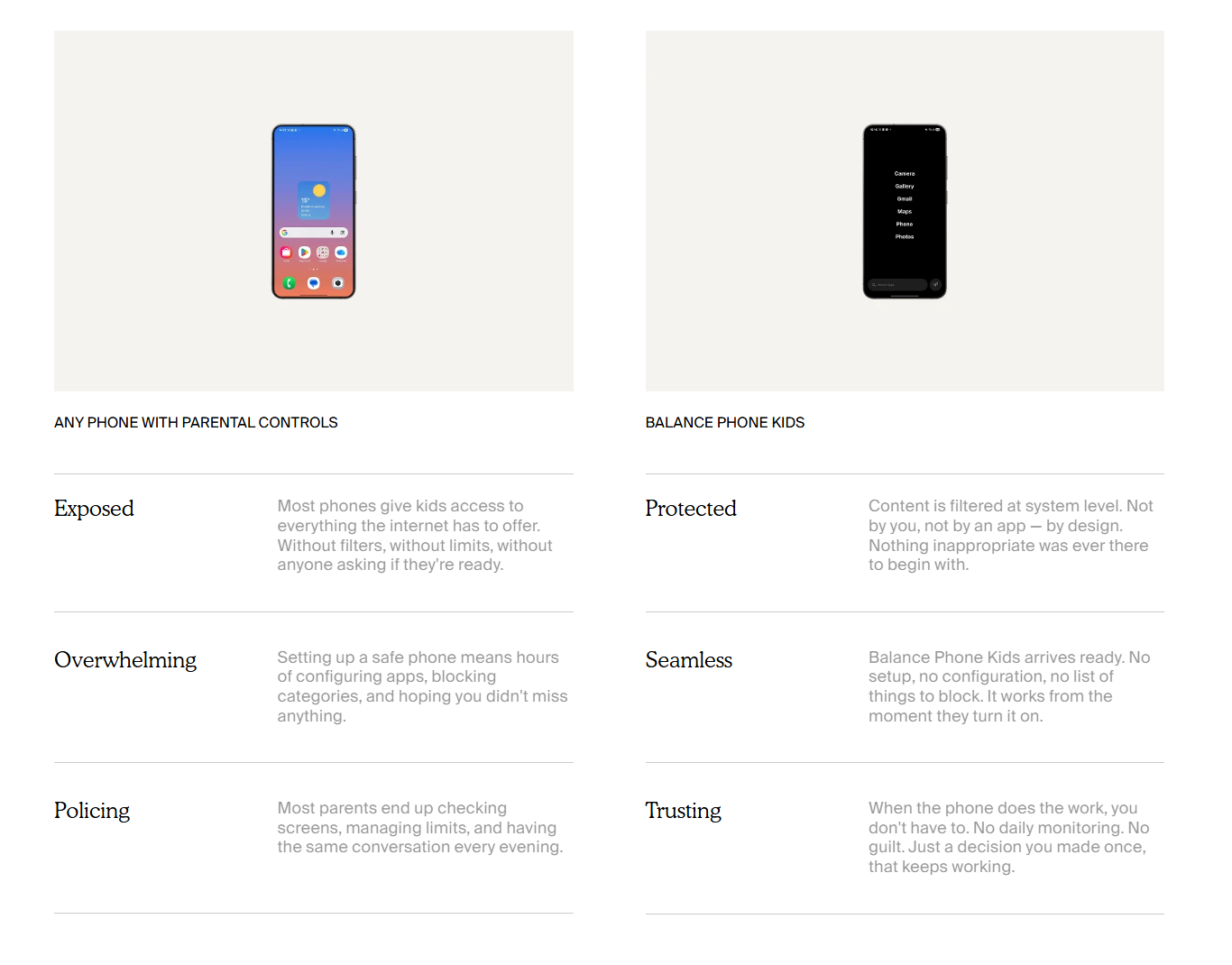
Setting it up. You switch it on, connect to Wi-Fi and follow the normal start-up screens. Balance OS then installs itself.
One tip: make sure the phone is on Wi-Fi during that very first start-up. If it is not, the phone finishes setting up as an ordinary phone, and you have to reset it and start again.
Using it every day. The home screen is a calm, plain list of app names in white on black. There are no bright icons and no red notification dots shouting for attention.
No checking up every evening. There is no dashboard to watch and no list of settings to manage.
If you want screen time limits or location sharing as well, the phone works with Google Family Link and other parental control apps. You can add more rules on top. You just cannot take Balance’s blocks away.
Fewer arguments. With ordinary parental controls, whoever holds the password ends up saying no to “five more minutes” again and again.
On a Balance Phone, there is nothing to negotiate, because TikTok is not on the phone and asking Mum or Dad will not change that.
What does Balance Plus add?
Balance Plus is an optional add-on for the kids’ phone. It costs £5.99 a month or £50 a year, and at the time of writing Balance offers the first three months free.
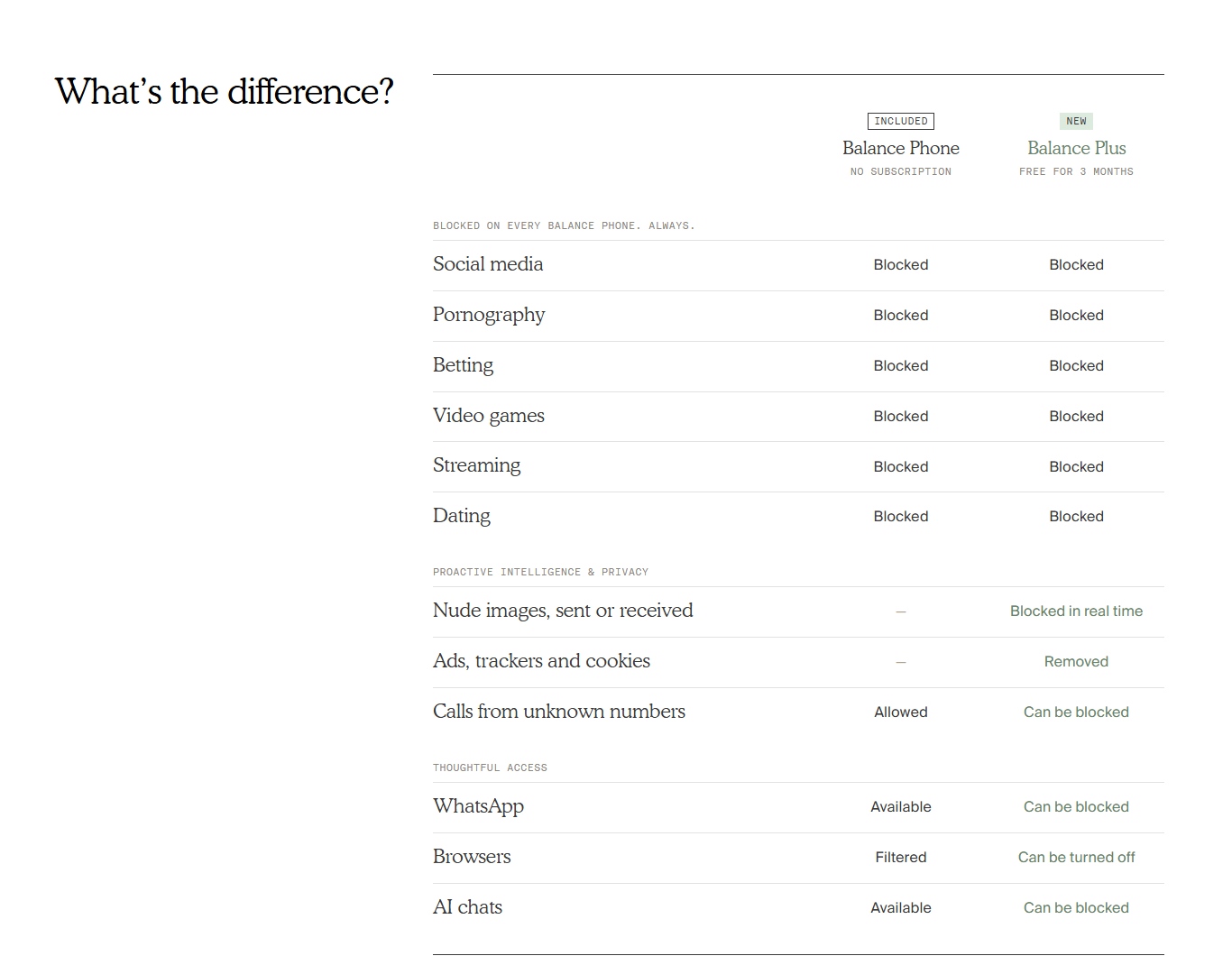
The feature we rate most highly is nude image blocking.
The phone already blocks porn websites. But a child could still be sent an explicit photo in a chat. With Balance Plus, the phone spots a nude image the moment it appears on screen and covers it, in any app.
The camera cannot take one, and the phone cannot send one. Balance says all of this happens on the phone itself, and nothing is sent anywhere.
That is a real help against sextortion, where a stranger pressures a child into sending a photo and then threatens to share it. Our post on sextortion explains what to do if this happens.
Balance Plus also lets you:
- switch off WhatsApp until you feel your child is ready
- turn off every web browser
- block AI chatbots such as ChatGPT and Gemini, including the AI built into apps like WhatsApp
- allow calls only to and from saved contacts
- remove ads and trackers
Everything starts switched off, so you choose what suits your child. You get a monthly summary, and Balance says it never shows your child’s messages or photos.
Is the Balance Phone good for adults too?
The Balance Phone is a great choice for adults. In fact, I use one myself, and I have switched my regular phone to a Balance Phone to control and cut down on my own phone use.
It is very easy to get distracted every time you pick up your phone. A basic phone can be a good answer to that, but for me it would mean missing things I need to stay on top of, especially in the online world I work in.
The Balance Phone sits in between. It stops me being pulled into the algorithms for hours, so I keep social media to set times of the day rather than having it in my pocket all the time.
At the same time, I still have the apps I need every day, such as WhatsApp, banking and maps.
I actually think adults may need a phone like this even more than children do. As adults, we talk to children about online safety and setting a good example, and using a phone like the Balance Phone is one of the clearest ways to show them what that looks like.
Balance says about half of the people using its phones are adults who bought one for themselves. One parent reviewing the phone on Balance’s website says they switched their own phone so they were not asking their child to do something they would not do themselves.
Balance Phone review: what are the downsides?
No phone is perfect, and an honest Balance Phone review has to cover the downsides too.
YouTube is blocked completely. That includes revision videos and the “how to” clips children use for homework. If your child needs YouTube for school, plan for a laptop or family tablet instead.
Games are blocked completely. For lots of children aged 9 to 13, Roblox and Minecraft are where their friendships happen, and they can still play on a console at home, just not on the phone.
But if you have a 9 to 13 year old, you really do not want them hanging out on Roblox on their own, out of sight on a phone. Our full guide to Roblox parental controls explains why, and how to set Roblox up safely on a family device.
You cannot make exceptions. You cannot allow one game as a treat, because you can only add more blocks, never fewer.
WhatsApp is on unless you pay to switch it off. Group chats are where a lot of the trouble children face actually starts. Without Balance Plus, the chats work as normal.
How much does the Balance Phone cost in the UK?
These are the UK prices on Balance’s website in November 2026.
| What you buy | UK price | Who it suits |
|---|---|---|
| Balance Phone Kids | £299, one-off (£279 in the Black Friday offer, which ends 30 November 2026) | A teenager moving on from a basic phone |
| Balance Plus add-on | £5.99 a month or £50 a year | Parents who want nude image blocking, or to switch off WhatsApp, browsers or AI chats |
| Balance Phone for adults | £429 | Adults who want to cut down on their own phone use |
| Balance software on your own Samsung phone | £79 a year | Anyone who already has a compatible Samsung phone |
The kids’ phone has no monthly fee unless you add Balance Plus. You keep your own SIM and your own mobile network.
It also comes with a 3-year warranty, and you have 14 days to send it back if it is not right for you.
Who is the Balance Phone right for?
Kids n Clicks calls the Balance Phone a transition phone. It sits between a child’s first basic phone and the full smartphone most teenagers will want once they are past 16.
If your child is under 14, we really recommend starting with a basic phone that calls and texts. Then, at around 14 to 16, a transition phone like the Balance Phone is exactly the right next step.
We think it is a brilliant fit for:
- teenagers aged around 14 to 16, who need WhatsApp, maps and school apps but are not ready for social media
- families following a smartphone free childhood who want a step between a basic phone and a full smartphone. Our post on what a smartphone free childhood means explains the idea
- parents who are tired of checking a phone every evening
- adults who want their time back from scrolling
It is less of a fit for:
- children under 14, who we think are better off with a basic phone first
- older teenagers past 16, who will push back hard against a phone with no social media at all
- families who want to choose app by app. An iPhone gives you more control, and our guide to parental controls on iPhone shows you how
Balance Phone review: our verdict
We really like the Balance Phone.
It gives your teenager a real smartphone with WhatsApp, maps, music and school apps, and the safety is built right into the phone, so you are not spending every evening checking up on it.
What sets it apart is that the blocks cannot be switched off by a determined child, a factory reset, or a quick search for “how to get round parental controls”.
If your child will use WhatsApp, we would add Balance Plus for the nude image blocking alone.
The big question is whether your family can live without YouTube and games on the phone. If you can, the Balance Phone goes straight to the top of our list as a transition phone for 14 to 16 year olds, and it is well worth a look for your own pocket too.
And remember, no phone replaces a good conversation. Tell your child they can always come to you if something upsetting happens online, and that they will not lose their phone for telling you.
For more help with your child’s phone, Kids n Clicks publishes free resources for parents and runs the Kids n Clicks app, which explains new apps and trends as they appear.
Parven Kaur is a digital parenting and online safety expert, and the founder of Kids n Clicks. She won the Scottish Cyber Security Award, and she sits on the National Board of Advisors for Barnardo’s Scotland.
Was this helpful?
Good job! Please give your positive feedback
How could we improve this post? Please Help us.